- A modern AI chatbot answers questions in plain language, using your business information, at any hour.
- It pays off when you get the same questions over and over, miss enquiries outside business hours, or lose leads who won't fill in a form.
- Done right, it knows when to stop and hand the conversation to a real person.
Chatbots used to be frustrating: a menu of buttons, a few canned replies, and "Sorry, I didn't understand that." AI has changed that. Today's chatbots understand normal questions and answer from your own content: services, opening hours, policies, prices if you want to share them.
But does a small business actually need one? Sometimes yes, sometimes no. Here's how to decide, what affects the cost, and how setup works.
What an AI chatbot actually does
A business chatbot sits on your website, on WhatsApp, or both, and handles the first part of a conversation:
- Answers common questions: hours, location, services, delivery, returns, "do you work with…?"
- Captures leads: asks for a name, email or phone number and what the visitor needs, then sends it to you.
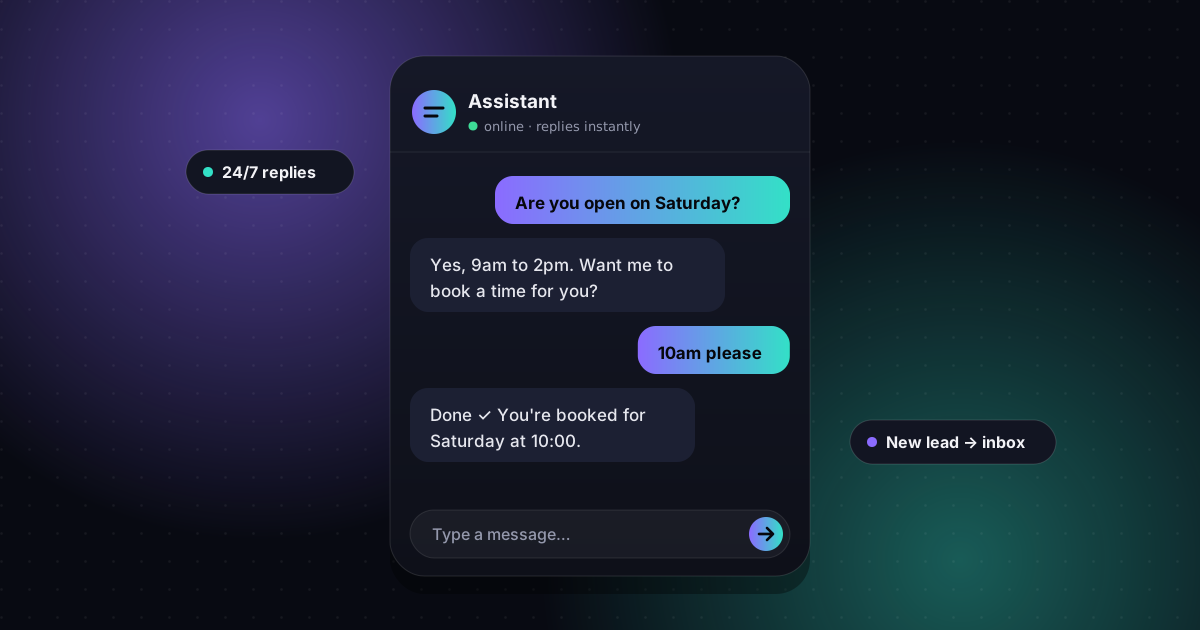
- Books appointments: connects to your booking calendar so customers can pick a slot without a phone call.
- Hands off to a human: passes the conversation to you when the question is complex, sensitive or a sales opportunity.
The important part is that it's trained on your information, not the whole internet. A well-built bot answers "Do you open on Saturdays?" with your real hours, and doesn't invent anything.
The real benefits for a small business
- You stop missing after-hours enquiries. Many visitors browse in the evening and at weekends. A bot answers immediately instead of making them wait until Monday.
- Fewer repetitive emails and calls. If you answer the same five questions every day, a bot can handle most of them.
- More leads than a contact form. Plenty of people won't fill in a form but will happily ask a quick question, and a chat can collect their details naturally.
- Faster replies. Response time matters. The business that answers first often wins the job.
- Multiple languages. AI chatbots can reply in the visitor's language, which helps if you serve international customers.
When you probably don't need one
A chatbot isn't the right move for every business. You can probably skip it, for now, if:
- you get only a few enquiries a week and can reply quickly yourself
- every enquiry needs a detailed, personal consultation from the first message
- your website has bigger problems first, like being slow, unclear or not showing up on Google
A chatbot amplifies a good website. It can't rescue a site that doesn't bring in visitors in the first place.
What affects the cost
Chatbot pricing varies a lot, because "a chatbot" can mean a simple FAQ helper or a full sales assistant. These are the factors that drive the cost up or down:
- Where it runs: website only, or website plus WhatsApp. WhatsApp needs a separate business setup and approval.
- How much it needs to know: a one-page FAQ versus a large catalogue, pricing tables and policy documents.
- Integrations: sending leads to email or a CRM, booking appointments, checking order status.
- Usage: AI providers charge per conversation volume, so a busy site costs more to run than a quiet one.
- Ongoing updates: keeping the bot's knowledge current when your services or prices change.
We give a fixed quote up front based on these factors, so you know the full cost before anything is built.
How setup works
- Collect your information. Services, FAQs, policies, hours, tone of voice and anything the bot must never say.
- Decide the goal. Answer questions, capture leads, book calls, or all three.
- Build and connect. Add the chat to your website and/or WhatsApp, and connect it to where leads should go.
- Test with real questions. Including awkward ones, off-topic ones and attempts to trick it.
- Launch and review. Read the first conversations, fill gaps in its knowledge and fine-tune the answers.
A note on WhatsApp
For many customers, WhatsApp is easier than a website chat. Business chatbots on WhatsApp use the official WhatsApp Business Platform from Meta, which needs a verified business setup. Meta also has rules about messaging: you can reply freely within a customer-service window after the customer messages you, while messages you start yourself use pre-approved templates. A proper setup follows these rules from day one, so your number doesn't get restricted.
Doing it safely
- Keep it on topic. The bot should only answer from your information and politely decline everything else.
- Always offer a human. Make it easy to reach you, and have the bot hand off when it's unsure.
- Be upfront. Tell visitors they're chatting with an AI assistant, and mention it in your privacy policy.
- Don't collect sensitive data. No card numbers or passwords in chat. Send people to secure pages for those.
So, do you need one?
If you get regular enquiries, answer the same questions again and again, or lose leads outside business hours, an AI chatbot is one of the most practical upgrades a small business can make right now. If not, focus on your website and visibility first, and add a chatbot when the enquiries start coming in.